
Unlimited image generation with Nano Banana Pro, GPT Image 2 and Claude Code Skills

Update: since writing this article, I've also added a second skill that wraps OpenAI's GPT Image 2 model - the repository linked further down now hosts both skills (and has been renamed to agent-skills accordingly). You can pick between Nano Banana Pro and GPT Image 2 depending on the task at hand - the results are quite impressive either way.
As of writing (this is going to change any time), Nano Banana Pro seems to be the best commercial image generation model - or, at least, I personally get the best results out of it, be it a realistic images or totally made up things.
As a Google AI Ultra for Business user, I get unlimited image generations included in my subscription - via Gemini Web UI or via Veo Flow. Google being Google, I can’t use Nano Banana via Gemini CLI - hell, I can’t even use Gemini 3 via Gemini CLI, even though regular none-business AI Ultra subscribers can. Most likely this is going to be fixed by the time you are reading this, but I think you will still benefit from the rest of the article - in the end, you can apply it to any other API.
I recently needed to generate a lot of different images - I was brainstorming some ideas for a new icon for my mobile app, as well as integrating a new mascot inside the app itself. Doing this via Gemini Web quickly became frustrating - it would just lose context all the time. Claude Code, on the other hand, is very good at managing the context - and it’s can decently analyze the images.
Back in October 2025, Anthropic introduced Claude Skills - which I can only describe as “extra tools wrapped by a simple prompt”. You can make the skills available to any projects or make per-project skills, depending on the use case.
I wrapped a tiny Python script that makes requests to Nano Banana Pro, and then wrapped this script into a Claude Skill and voilá - I can now ask Claude to do any kind of image generation work for me. The added benefit is being able to pass additional parameters and, for example, get proper 4K images - something Gemini’s Web UI is not capable of doing.
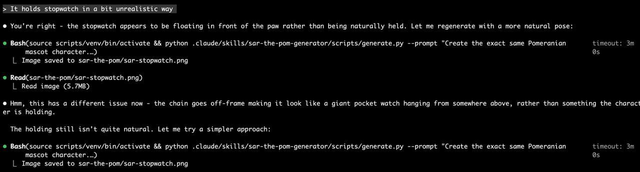
It’s kind of fascinating to see Claude looking at the images, figuring out that something is not right and re-generating them till it “thinks” they are alright:
I am going to put a link to our new public repository with Claude skills in a bit, but let’s just do a quick look at some of the iOS icons I got:



In total, I was able to generate over 100 icons, till I finally got the result I wanted. While it did cost $45 in inference costs, I’d consider it a small price for the amount of material and iterations over this material I got.
Repository is here.
Extra tip
One of the more impressive things I found about Nano Banana Pro is how it can handle text - both preserving existing text, but also adding or replacing it. It helped me a lot with translating some App Store screenshots, just by passing an original with English text and asking to translate it to German or Spanish.